
Introducing Capital Plan Optimization
Meet Capital Plan Optimization: CivilGrid's new product for finding paving moratoria, planned capital projects, and right-of-way conflicts across your whole portfolio.


We've worked with dozens of utilities and infrastructure owners across tens of thousands of projects. And in that time, we've come to learn that execution is often the bottleneck, not funding. Let's say you've got your funding and mandate for a set of projects. Your program manager locks in a multi-year portfolio against that flat funding. What determines whether or not that work can get done within the budget? Capital plan optimization starts with that question.
Even if you have the money, the crews, and the resources, you may not have the key information that will actually ensure execution. Unknown paving moratoria, conflicting schedules with other companies' projects, and missed permitting requirements can quickly derail timelines and blow up budgets. This vital data is scattered across dozens of municipal agencies, project websites, and right-of-way maps. Tracking it all down, correlating into something useable, and planning around it quickly becomes an unmanageable task for big portfolios.
Introducing Capital Plan Optimization
Capital Plan Optimization is designed to manage the massive task of collecting and organizing conflict data into something actionable, allowing you to confidently execute your plan, within budget.
Before you lock in your own plan, you can see a breakdown of every paving moratorium, planned capital project, and right-of-way restriction that overlaps with your project areas and construction windows. In one dashboard, you can see whether each project should be accelerated, deferred, or reviewed further, giving you an instant picture of your portfolio's health. Then, as you zoom into each individual project, we provide the chain of custody information that enables you to trace back each piece of conflict data to the source, giving you opportunities to bundle projects and Dig Once.
Check out our dedicated Capital Plan Optimization page to see the feature in action, and read on to learn more about how this feature came to be.
Conflict Data: The "Unknown Unknowns"
When Capital Plan Optimization was first coming together, we worked with PG&E to see exactly what it could do for a large portfolio. They used it on their portfolio of over 1600 projects, and across them, uncovered over $60 million in avoidable costs due to conflict data. Were these conflicts not surfaced early into planning, it would be too late to schedule or scope around them. PG&E would have had to absorb the additional restoration costs, or re-schedule last minute.
As we expanded our tests, we found this wasn't an anomaly. Many customers were missing conflicts, leading to delays, cost overruns, and planned work slipping from one year to the next. Unlike the "Known Unknowns" of their plans, such as budget estimates and crew requirements, where they knew which questions to ask in order to proceed, conflict data was treated as an "Unknown Unknown", where teams didn't know what to ask, let alone where to look.
It wasn't from lack of trying. Paving cut moratoria sit in one city's public works database. Planned capital projects are spread across a dozen agency websites. Right-of-way restrictions are buried in permit portals and PDF maps. For a single project, a determined engineer can piece it together. For a portfolio of hundreds or thousands of projects, it's unfeasible and won't happen. This big-picture perspective on conflict was impossible to even imagine, let alone stitch together.
Building the Big Picture of Conflict Data
We realized building this big picture perspective was a lot like building CivilGrid's site data basemaps: instead of showing a comprehensive picture of what's underground your project site, this would show a comprehensive picture of what's in the project site's future. To be most useful, it should have the same goals and qualities of our basemaps. Let's explore some of them.
Full chain of custody representation
In our basemaps, each piece of utility location data comes with complete information about its provenance, including the original as-builts and other documents. This chain of custody is necessary to maintain boundaries of liability between you and the asset owners, and to qualify the data as ready to be stamped as SUE QL-D. This level of certainty is foundational to preliminary design and triage, and developing further surveying plans.
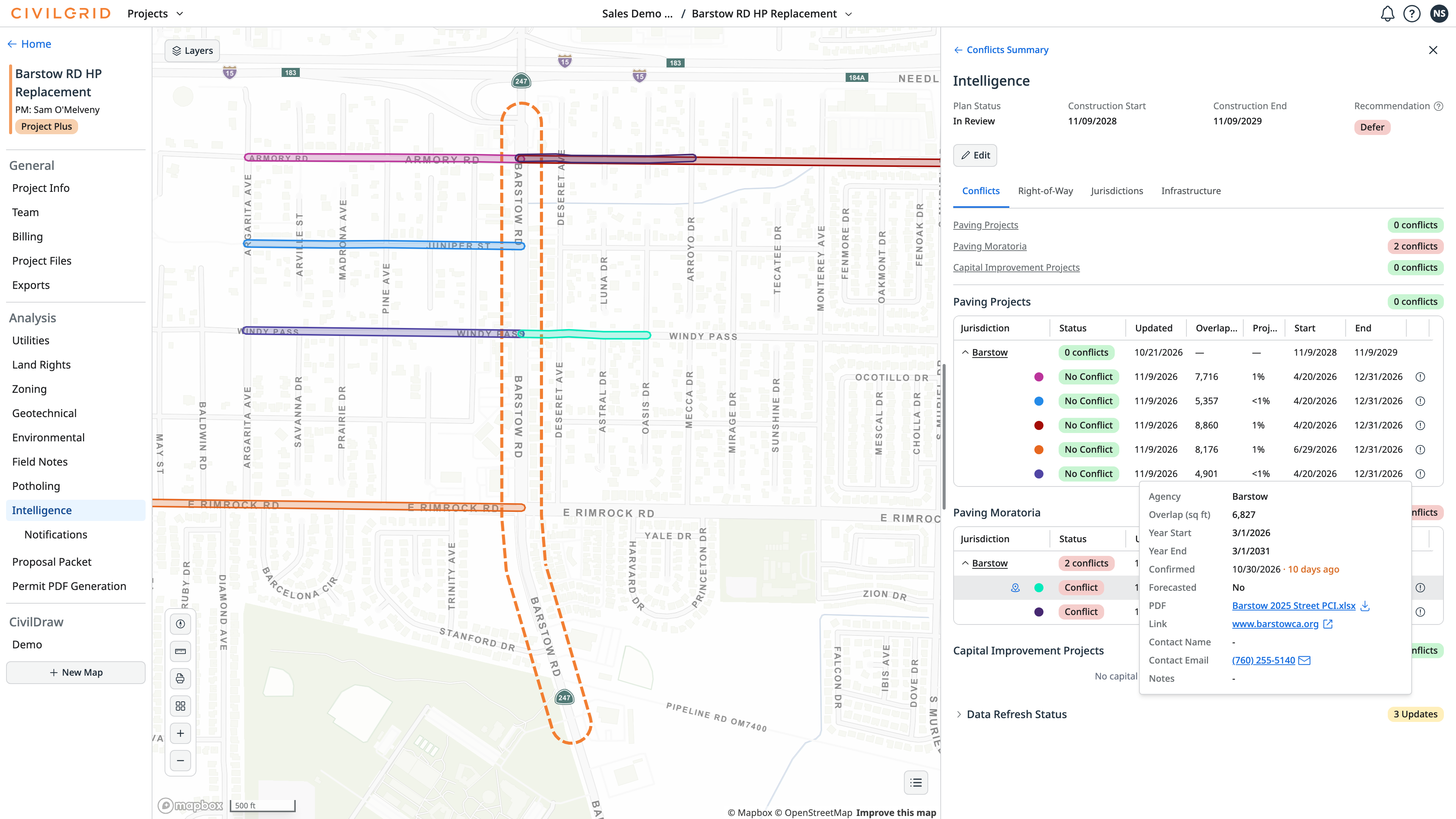
Chain of custody data for conflict analysis is similarly helpful. We provide the source for each piece of data, so you can follow up with the owners yourself. Dig Once policies encourage projects to schedule cooperatively to minimize the amount of times ground needs to be broken and streets need to be repaved. By providing the exact person you need to contact to initiate that process, Capital Plan Optimization makes it easier than ever to Dig Once.
Visualizing and planning as layers on a basemap
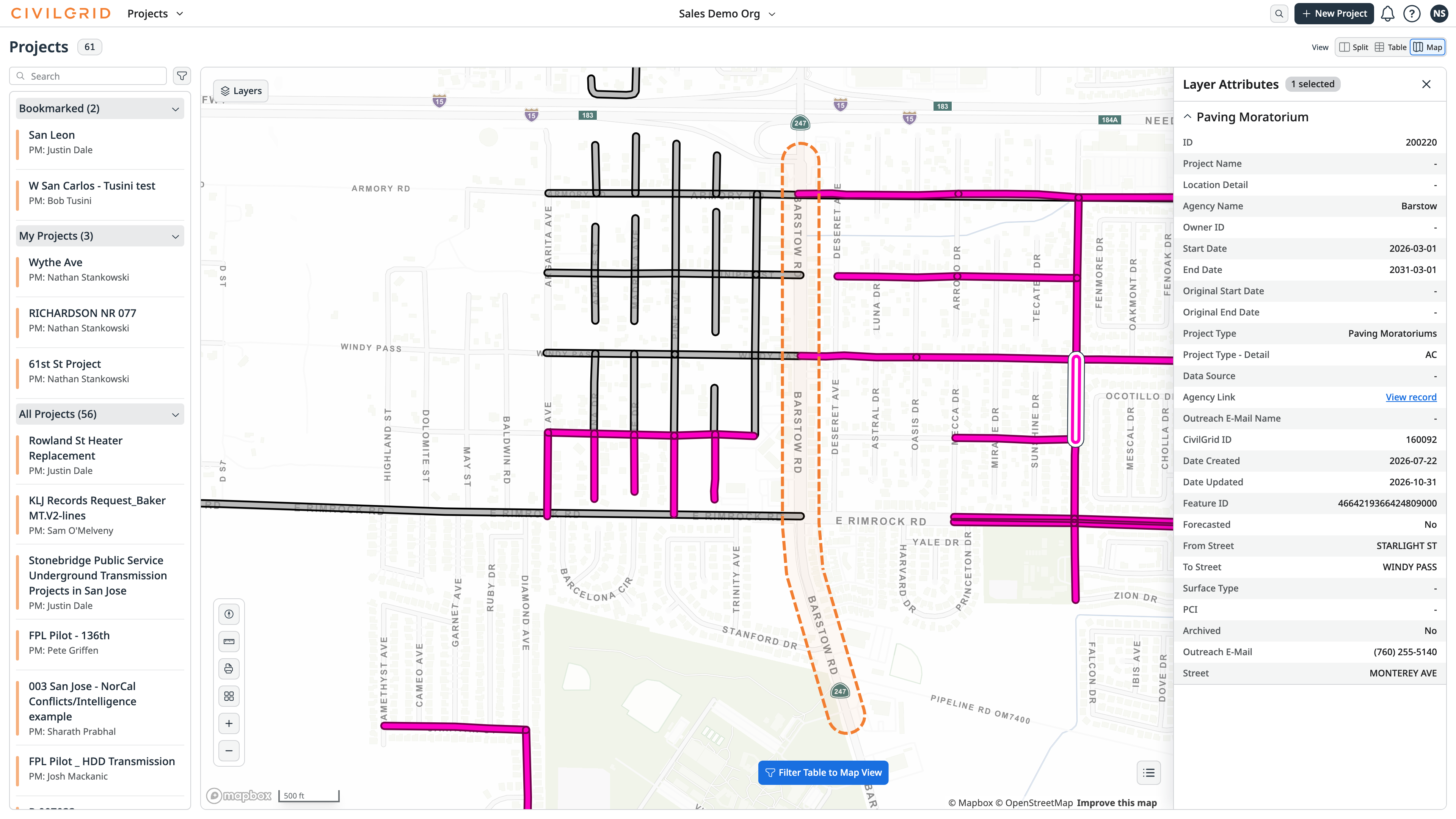
A key benefit of CivilGrid is putting all of the site data you need in one basemap, viewable as layers. When it comes time to start doing preliminary design and planning, you need to be able to visualize how everything will interact in the physical space of the project.
We knew conflict intelligence data needed to live here too. With the layer turned on, you can see exactly where paving moratoria and other potential conflicts live alongside utilities, permit boundaries, and all the rest of your layers. By clicking on any conflict data point, it brings up all the details about the conflict's schedule and chain of custody.
Staying on top of unknowns
CivilGrid is all about building a complete context, from the big picture down to the details. When you look at your project, you can see a summary of all the utility owners operating in that project area. We show you in one overview what data you have and what data is still to come, turning unknown unknowns into known unknowns. Then, you can look at each individual utility line, with exact information on where it lives, sourced from the original as-builts and documentation.
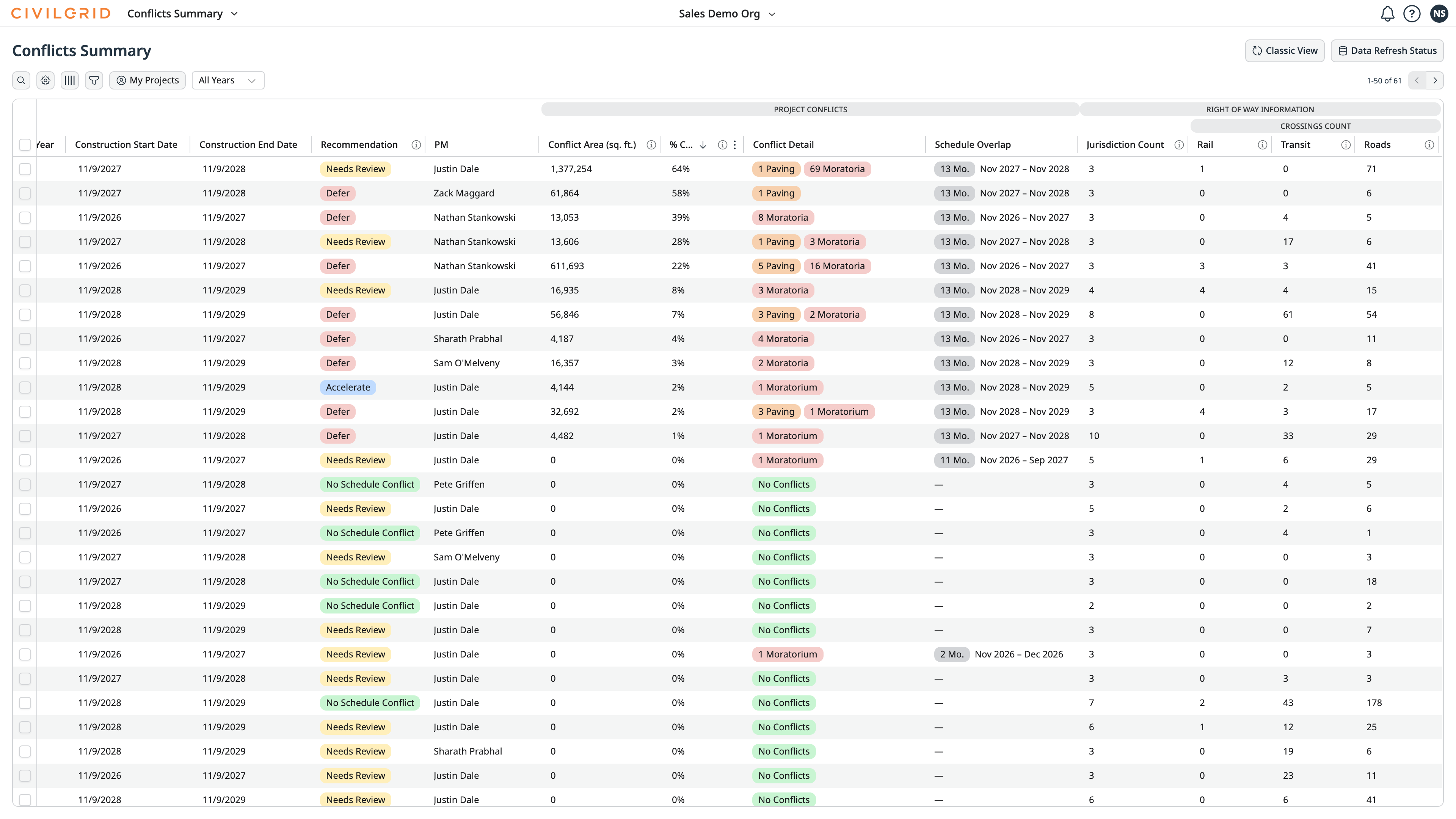
Capital Plan Optimization also has both a big picture dashboard and the ability to dig deeper. You can see the status of every project in your portfolio, with recommendations of Accelerate, Defer, and Review based on the potential conflicts surfaced. When it comes time to review, you can look at the exact timing and location of each conflict, along with the source, giving you everything you need to mitigate conflicts.
Turning Unknowns into Knowns
CivilGrid answers one of the biggest questions every construction project starts with: what's already underground here? With CivilGrid's Capital Plan Optimization, we answer another one of the biggest questions: what are other agencies planning on doing here?
We gather the answer from scattered sources and make it complete and actionable: a dashboard of all your projects, with the tools to deal with each and every conflict before it becomes a problem.
Check out our overview page to see more of Capital Plan Optimization in action, or read on for quick answers to some common questions.
What is CivilGrid Capital Plan Optimization?
Capital Plan Optimization is a new product that allows customers to plan and prioritize their projects across their entire portfolio by surfacing all of the potential conflicts and opportunities that would impact scopes and schedules, including paving moratoria and other planned capital projects.
All of this data is bundled together and analyzed to provide customers with a summary recommendation (Accelerate, No Conflict, Defer, or Needs Review) that allows you to easily monitor the status and execution risks of upcoming work. Every piece of data is sourced directly from the asset owner, so you can Dig Once, and execute efficiently.
CivilGrid's Capital Plan Optimization also tracks changes to the records, so you aren't surprised when city plans change. We send a weekly summary email of all new information so you'll never get stuck working with outdated information.
Where does the data in CivilGrid come from?
We collect all of the data directly from the original source: municipalities, DOTs, and other project owners. Every piece of data includes a chain of custody back to those sources, so you can connect with other agencies to optimize schedules together. We also provide information on when the data was collected, so you can ensure it's up to date.
Where does the data in Capital Plan Optimization live?
All of the relevant data lives in two places. First, it lives in the Capital Plan Optimization view, where you can look at a dashboard and timeline across all of your projects, along with flags and warnings where conflicts currently exist. This gives you the big picture perspective on where your capacity to execute is at risk and what opportunities you have to optimize your plans portfolio-wide.
Everything also lives on the project level, in the CivilGrid basemap. Turn on the Conflict Intelligence layers and you can see where moratoria and other restrictions sit, right next to utility data, your planned lines, and every other piece of relevant site data. You can collaborate and plan right on the map, then export everything into the CAD tools of your choice.
Who uses Capital Plan Optimization?
CivilGrid's Capital Plan Optimization feature is built for two main groups. First, the project manager and engineers for each individual project can use it to ensure their plans, designs, and overall project scope are tested against a comprehensive view of conflicts. They can see a list of every potential conflict in the Intelligence tab of their project, allowing them to work through each one and develop mitigation plans or absorb the impact in their timelines and budgets.
Then, at the portfolio level, program managers, planning leads, or capital planning managers can use Capital Plan Optimization to help build out years of work at a time. They can rank each project by execution risk based on potential conflicts flagged by CivilGrid, which suggests Accelerate, No Conflict, Defer, or further Review for each. Planners can arrange projects to minimize risk and maximize work completed for a given budget. Once the preliminary schedule is complete, they can continually review and update it as more conflict information comes in without the time and cost of manually tracking down new data.
What are the key benefits of Capital Plan Optimization?
The main reasons to use our Capital Plan Optimization feature include:
- Spend less time on project scoping. By having all the data you need easily available, you can make decisions faster, reducing delay before projects can begin.
- Make better and more informed planning decisions to save money. With comprehensive and up-to-date conflict intelligence available, you won't accidentally violate moratoria or miss a permit.
- Design faster with less rework. With conflict intelligence, such as moratoria and permitting boundaries, in your CivilGrid basemap alongside utilities and other site data, you can make design decisions that account for other projects, preventing redesigns and saving you time and money.
- Avoid surprises when things change. When other planned capital projects change their schedules or boundaries, you'll find out as soon as possible. You'll have time to reorganize your plans and account for costs instead of having a costly surprise in the field.
The short version
- Capital Plan Optimization is CivilGrid's new product for surfacing the paving moratoria, planned capital projects, and right-of-way restrictions that overlap your projects.
- One dashboard recommends whether to accelerate, defer, or review each project, and every conflict links back to its source.
- Conflict data also appears as layers on the CivilGrid basemap, next to utilities and the rest of your site data.
Ready to see what bad data was hiding?
